Scripts and assertions
A script is what turns a request into a test. The lines after a request that begin with > run the moment the response arrives: they check what came back, and they keep anything a later request will need.
The smallest one is a single check. This file is whole, so it can be saved as posts.stamp and run as it stands.
### List posts
GET https://jsonplaceholder.typicode.com/posts?_limit=5

> assert status == 200
assert takes an expression. If it holds, the check passes. If it does not, the check fails and the run fails with it. status is one of the names the response leaves within reach of the script:
status | the status code, as a number |
body | the body, parsed when it is JSON and text otherwise |
text | the body exactly as it arrived |
headers | the response headers, names in lower case: headers["content-type"] |
time, size | milliseconds taken, and bytes received |
url | the address that answered, after any redirects |
Run the file and every check is listed under the request it belongs to, with a tick or a cross, and counted at the end.
stamp run posts.stamp

→ GET https://jsonplaceholder.typicode.com/posts?_limit=5  posts.stamp › listPosts
  200 OK  63 ms  1 KB
  ✓ status == 200

✓ 1 request, 1 assertion
A check that fails is marked with a cross and followed by the value that was there instead, wherever it is read: in the terminal, in the Tests tab, in a report. On the command line it also makes the exit code 1, which is the whole of what a CI job reads.
Two requests in a row is where the rest of it earns its place. set keeps a value for everything that runs after it, @needs names the request that has to go first, and an assert can carry a message saying what was expected.
### Log in
POST https://dummyjson.com/auth/login
Content-Type: application/json

{ "username": "emilys", "password": "emilyspass" }

> assert status == 200, "could not log in"
> set token = body.accessToken

### Current user
@needs logIn
@auth bearer {{token}}
GET https://dummyjson.com/auth/me

> assert status == 200
> assert body.username == "emilys"
> assert time < 2000
The name in @needs logIn is the first request's title turned into an identifier: Log in becomes logIn. It runs once a session, however many requests ask for it. What set stored is a variable like any other, so {{token}} reads in a URL, in a header or in an @auth line. The earlier response is there in full under that same name, which saves storing a value twice: {{logIn.body.id}}, or assert logIn.status == 200.
There are five statements in all.
assert condition, "message" | a check; the message is optional and is shown when it fails |
set name = value | a value for every later request in this session |
save name = value | like set, and written to environment.local.stamp |
let name = value | a value for the rest of this script |
print value | a line of console output |
That covers most requests. What follows is for the ones where a single value is not what you are checking.
Because an assertion is an expression, a whole list can be checked at once. all, any, count, map, filter, min, max and sum take a lambda, contains and matches work on text, and let names something the lines below it reuse. The lines here are a script, not a whole file: they sit under a request that lists products.
> let prices = map(body.products, product => product.price)
> assert all(prices, price => price > 0), "every product needs a price"
> assert count(body.products, product => product.stock == 0) == 0
> assert headers["content-type"] contains "json"
> assert body.products[0].title matches "^[A-Z]"
> print "cheapest " + min(prices) + ", dearest " + max(prices)
save is set that outlives the run. The value is written to environment.local.stamp, filed under the dimension values in effect when it ran, so the next run starts with the token already in hand. That file is the personal one, the one that stays out of the repository.
stamp run . --no-save # do not let save write to the local fileIn the app
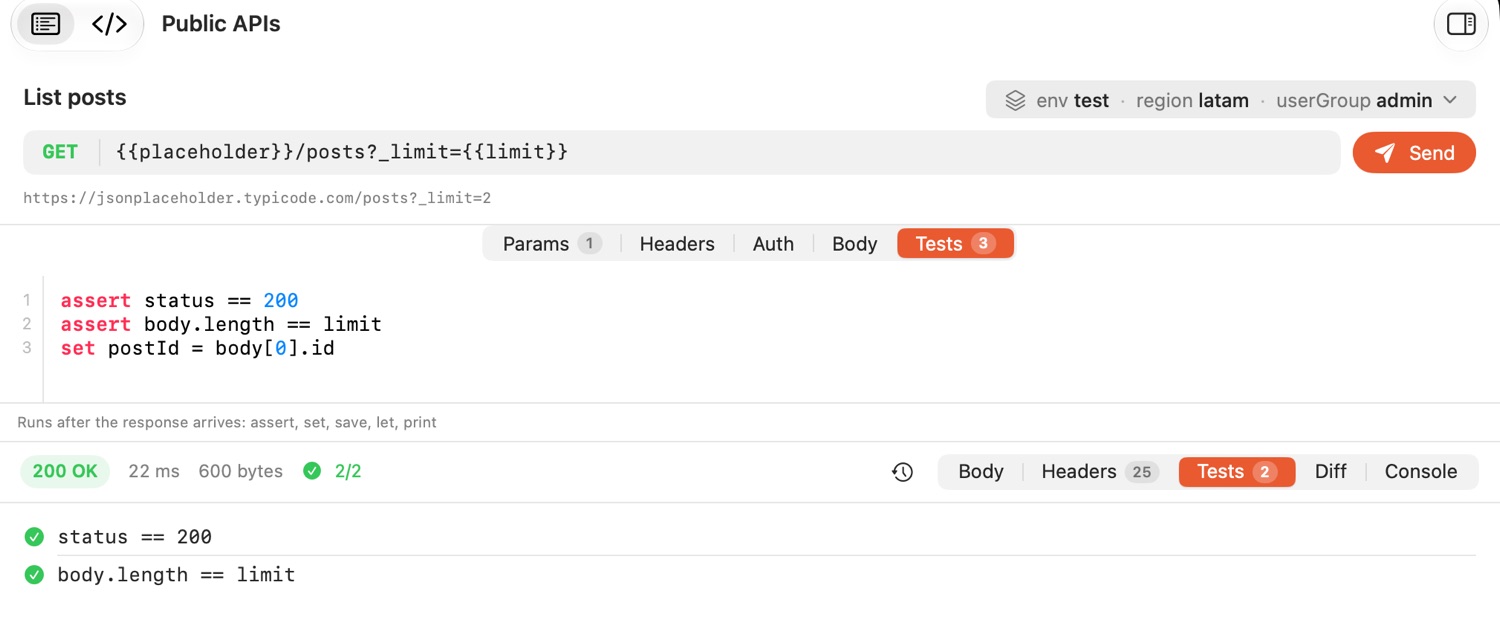
- Select the request in the sidebar and open the Tests tab. The badge beside the tab counts the lines the script already has.
- Write the lines there, one to a line. The bar under the editor names what is in reach once a response arrives:
assert,set,save,letandprint. - Press ⌘↩. The bar above the response fills in with the status, the time and the size, and then with a count in green or red: how many assertions passed out of how many.
- Click that count. It opens the response's Tests tab, where every check is listed with a tick or a cross, its condition as you wrote it, and under that the message you gave it or the value found instead.
- Open Console for what
printwrote. The request line is at the top of it, and an error is in red.
The file holds the script; the window holds what happened to it. A failing run is one click from the check that failed, with the value it actually found written underneath, and the body that produced it is one tab away.
Next: Test plans for running several requests in order with checks between them, Secrets for keeping a token out of git, and Authentication for the @auth line above.