Race conditions
Some bugs only appear when two requests arrive at the same instant: the coupon redeemed twice, the last seat sold to two people, one balance debited twice. concurrently fires several requests together, on purpose, and then checks that only one of them got through.
It is a statement inside a test plan, so it goes in a .stamp file above the first request. The file below is whole and can be run as it stands.
plan OneCouponOnly {
  concurrently 5 {
    run redeemCoupon with code = "WELCOME"
  }

  expect length(results) == 5
  expect count(results, r => r.status == 200) == 1, "more than one actor redeemed the coupon"
}

### Redeem coupon
@code = WELCOME
POST https://httpbingo.org/anything/coupons

{ "code": "{{code}}" }
Four things to name:
concurrently 5 { … } | Starts five actors and holds every one of them until the last is ready, so they begin at the same moment. The block ends when all five have finished. |
run redeemCoupon … | What one actor does. Each has its own copy of the session, so they do not overwrite each other's values. |
results | After the block, the last response of each actor, in actor order: results[0] is the first actor's. |
count(results, r => r.status == 200) == 1 | The check that matters. Five tried, one may succeed. |
Run it with stamp test, the same command a plan uses, and it fails.
stamp test coupons.stamp

▶ OneCouponOnly  coupons.stamp
  ✗ run  252 ms
    expect count(results, r => r.status == 200) == 1, "more than one actor redeemed the coupon" (more than one actor redeemed the coupon)
✗ 1 iteration, 5 requests, 2 checks, 254 ms

✗ 1 of 1 plan failed
That failure is the point of running it here. The address above is an echo: it has no coupons and no limit, so it serves all five, which is exactly the report an API with the bug gives you. Point redeemCoupon at the service that owns the coupon and a pass means the limit held under five simultaneous attempts.
Five requests, two checks, one iteration. The actors are not iterations: the whole block happens inside one run of the plan, so matrix and data still mean what they meant.
That is the whole mechanism. The rest is for races that need more than one step of preparation.
Lining them up later than the start
Actors already start together, but a realistic race has each actor doing something of its own first, and that something takes a different length of time for each. sync "label" holds every actor at that line until all of them have reached it, which puts them back on the same instant after the slow part.
plan OneCouponOnly {
  setup { run logIn }

  concurrently 5 {
    run startBasket with who = actor
    sync "ready"
    run redeemCoupon with code = "WELCOME"
    share winner = actor
  }

  expect count(results, r => r.status == 200) == 1
  expect shared.winner != null
}
setup { run logIn } | Runs once, before the actors. Each actor starts from a copy of the session it left, so one login serves all five. |
actor | The actor's number, from 0 to 4. Useful for giving each one its own basket, or its own row of data. |
sync "ready" | The gate. Five baskets take five different lengths of time; after this line the five coupon requests go out together. |
share winner = actor | Publishes a value every actor can read as shared.winner, and which outlives the block. |
The plan above names three requests that live elsewhere in the workspace, so it is not a file on its own. Two things to know about sync: it only works inside concurrently, and it gives up after 30 seconds, reporting that not every actor arrived. An actor that failed before reaching the gate is the usual reason.
Inside a step, and over a matrix
A concurrently block can sit inside a step, which is how a race becomes one named part of a longer plan rather than the whole of it. Everything a plan offers still applies: the step is retried as a whole, and matrix runs the race once per environment.
plan Checkout {
  matrix env = test|staging

  step "Only one of five gets the last seat" {
    concurrently 5 {
      sync "go"
      run bookSeat with seatId = "A1"
    }
    expect count(results, r => r.status == 201) == 1
  }
}
bookSeat is again a request kept elsewhere in the workspace. results belongs to the block above it, so a plan with two races reads each one's results after its own block.
What a race gives you
concurrently N { … } | N actors, started together, each with a copy of the session |
sync "label" | Holds every actor until all of them arrive; 30 seconds and it gives up |
actor | This actor's number, counting from 0 |
share name = value | A value published to the other actors as shared.name |
results | Each actor's last response, in actor order, after the block |
The checks worth writing are nearly always counts. count(results, r => r.status == 200) == 1 for the thing only one may have, count(results, r => r.status == 409) == 4 for the four that should have been turned away by name rather than by a 500, and length(unique(map(results, r => r.body.id))) == 1 for the record that must not have been created twice.
stamp test coupons.stamp            # the plan, actors and all
stamp test . --tags race            # the races and nothing else
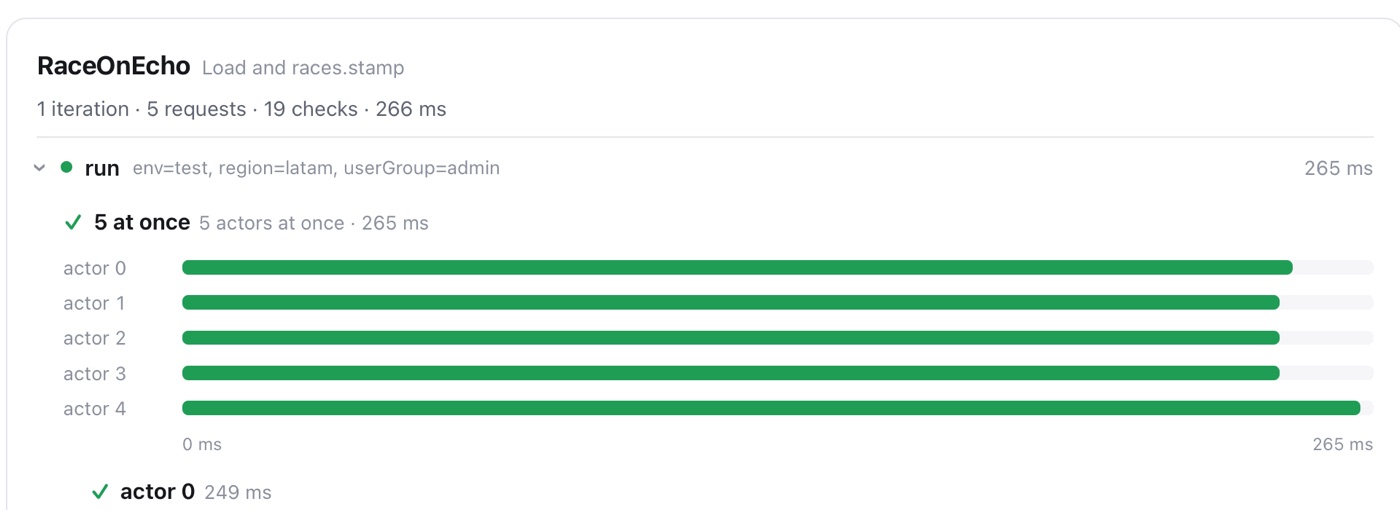
stamp test . --html report.html     # the actors on one clock
In the app
- Pick the plan under Test Plans in the sidebar and press ⌘↩. A plan with a
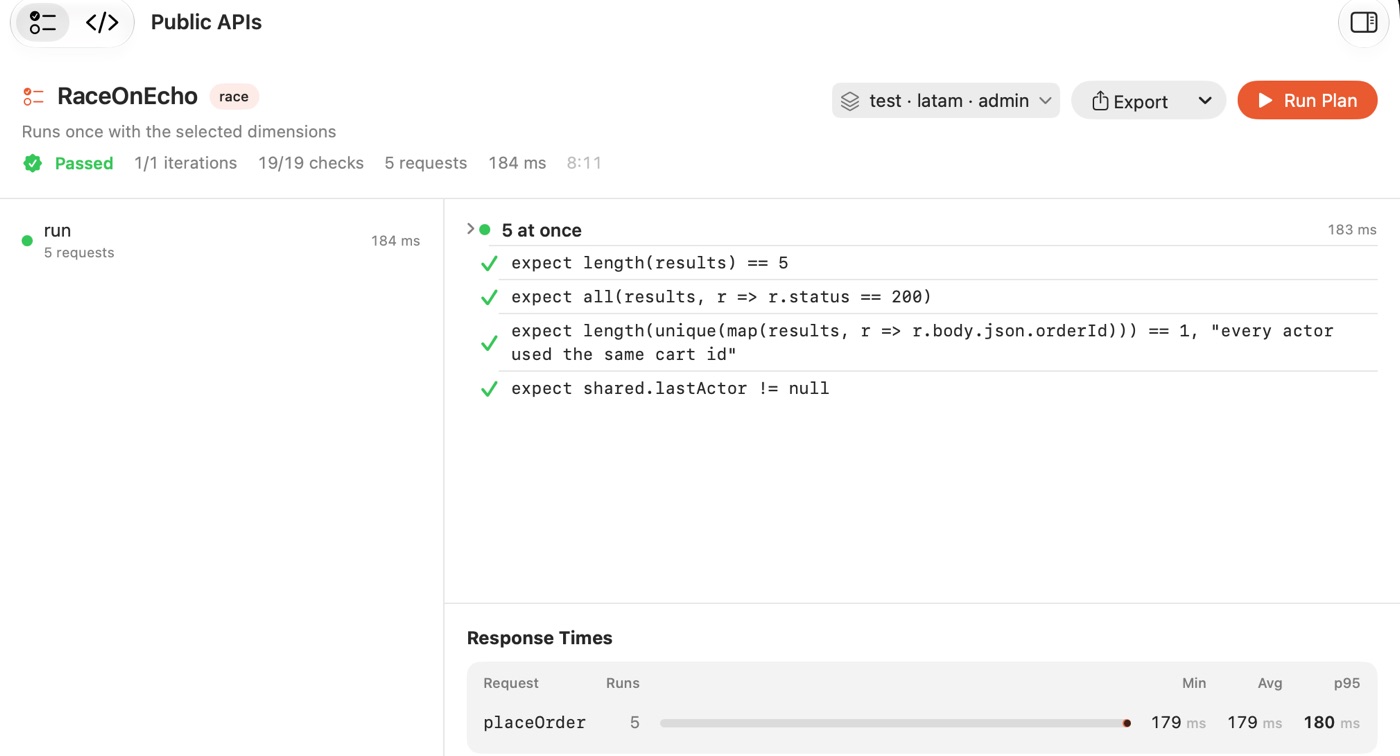
concurrentlyblock runs like any other. - When it finishes, the iteration's events are the tree on the right. The block is one row, 5 at once, with the time the whole block took.
- Open that row. actor 0 to actor 4 are folded under it, each timed on its own, because how long one actor took while the other four ran is what a race is read by.
- Open an actor and select the request inside it. The exchange that actor sent and received opens underneath, so which of the five got through is a status you read rather than a number you infer.
- The
expectlines after the block are the rows that follow it, each with a tick or a cross. One that fails shows the message you wrote, or, when you wrote none, the number it actually counted.
Five requests that went out at the same instant do not read as a list. The window keeps each actor's time apart and each actor's response whole, which is the difference between knowing the check failed and knowing which actor won.
The clearest view of a race is the HTML report, which draws the actors as lanes on one clock, so the overlap is visible rather than inferred.
Next: Test plans for the steps and settings around the block, Load tests for sustained traffic rather than one instant, and Reports for the file that shows the lanes.