MCP servers
An MCP request connects to a Model Context Protocol server the way an agent's client would: it does the handshake, lists what the server offers, and then runs your script against the open session. It is how a server gets tested while it is being built, without a model anywhere in the picture.
Here is one against a public server. It runs as it stands.
### DeepWiki
MCP https://mcp.deepwiki.com/mcp

> assert server.serverInfo.name == "DeepWiki"
> assert toolNames contains "read_wiki_structure"
> let topics = call("read_wiki_structure", { repoName: "modelcontextprotocol/modelcontextprotocol" })
> assert !topics.isError
> assert topics.text != ""
Read it in the order it runs.
MCP https://… | The Streamable HTTP endpoint. Headers and @auth go with every message of the session, so a server behind a token is no different. |
server | The result of the handshake, which has already happened by the time the first script line runs: serverInfo, capabilities, protocolVersion and instructions. |
toolNames | The names of the tools the server listed. tools holds them whole, with their input schemas. |
call(…) | Calls a tool and gives back what the server answered, with text added: the text of the content, joined. |
isError | Set when the tool itself reported a failure, which is not the same as a broken request. |
stamp run deepwiki.stamp

→ MCP https://mcp.deepwiki.com/mcp  deepwiki.stamp › deepwiki
  200 OK  1.82 s  7 KB
  ✓ server.serverInfo.name == "DeepWiki"
  ✓ toolNames contains "read_wiki_structure"
  ✓ !topics.isError
  ✓ topics.text != ""

✓ 1 request, 4 assertions
The body of the response is everything the session saw: what the server says it can do, every tool, resource and prompt it listed, and every message that went in either direction.
A server you are writing is usually not on the web yet. The target can be a local endpoint, MCP http://localhost:3001/mcp, or stdio: and the command that starts the server, which is run from the folder the file is in. The request below wants a server of your own, so it will not run as it stands.
### My server
MCP stdio: node build/index.js --verbose

> assert toolNames contains "search"
> assert !call("search", { query: "tea" }).isError
The Mac App Store app runs in a sandbox that cannot start other programs, so a stdio: server runs from the command line tool; the app connects to servers over HTTP.
What a script can read, and what it can ask for:
server, notifications | the handshake, and every notification received so far |
tools, toolNames | the tools, and their names |
resources, resourceTemplates | the resources, and the templates with variables in their URIs |
prompts, promptNames | the prompts, and their names |
call(tool, arguments, meta) | calls a tool; meta becomes _meta, such as { progressToken: "p1" } |
read(uri), getPrompt(name, arguments) | reads a resource, gets a prompt |
ping(), request(method, params), notify(method, params) | a ping, any request at all, and a notification, which can stand on its own line |
One rule worth knowing before it bites: a call to the server is made before the rest of its statement runs, so it cannot be used inside an inline function (=>). Call first with let, then use the result.
What is left is the awkward half of the protocol: the failures, and the things a server asks of its client. Both are where a server is usually wrong, so both can be asserted on.
A JSON-RPC error does not stop the script. It comes back as { error: { code, message } }, and a tool that failed also sets isError, so a missing tool, a tool that rejected its arguments and a method the server never implemented are all checked the same way.
### What the server does wrong
MCP stdio: npx -y @modelcontextprotocol/server-everything

> let missing = call("no-such-tool", {})
> assert missing.isError
> let bad = call("get-sum", { a: "two", b: 40 })
> assert bad.isError
> assert request("no/such/method").error.code == -32601
A server may also ask the client for a model completion, for a value from the person at the keyboard, or for the folders it is allowed to look at. Three directives answer, and each one declares the matching capability in the handshake. A request the file does not answer gets a method-not-found error back, which is itself a thing to test.
### Everything server
@sampling reply Sunny, 24°C
@elicitation accept { "name": "Ada" }
@roots file:///work/app
MCP stdio: npx -y @modelcontextprotocol/server-everything

> assert call("trigger-sampling-request", { prompt: "What is the weather?" }).text contains "Sunny, 24°C"
> assert call("trigger-elicitation-request", {}).text contains "Ada"
> assert call("get-roots-list", {}).text contains "file:///work/app"
@elicitation also takes decline and cancel, for the paths a server tends to forget. The two snippets above need Node.js, since npx starts the reference server, and both run from the command line tool.
Notifications arrive while the script runs and pile up in notifications, so progress can be counted after the call that caused it:
### Progress
MCP stdio: npx -y @modelcontextprotocol/server-everything

> let slow = call("trigger-long-running-operation", { duration: 1, steps: 2 }, { progressToken: "steps" })
> assert !slow.isError
> assert count(notifications, n => n.method == "notifications/progress") == 2
For anything the functions above do not cover, send writes a JSON-RPC message exactly as you typed it, receive takes the next notification or the answer to it, and close ends the session, which otherwise ends with the script.
In the app
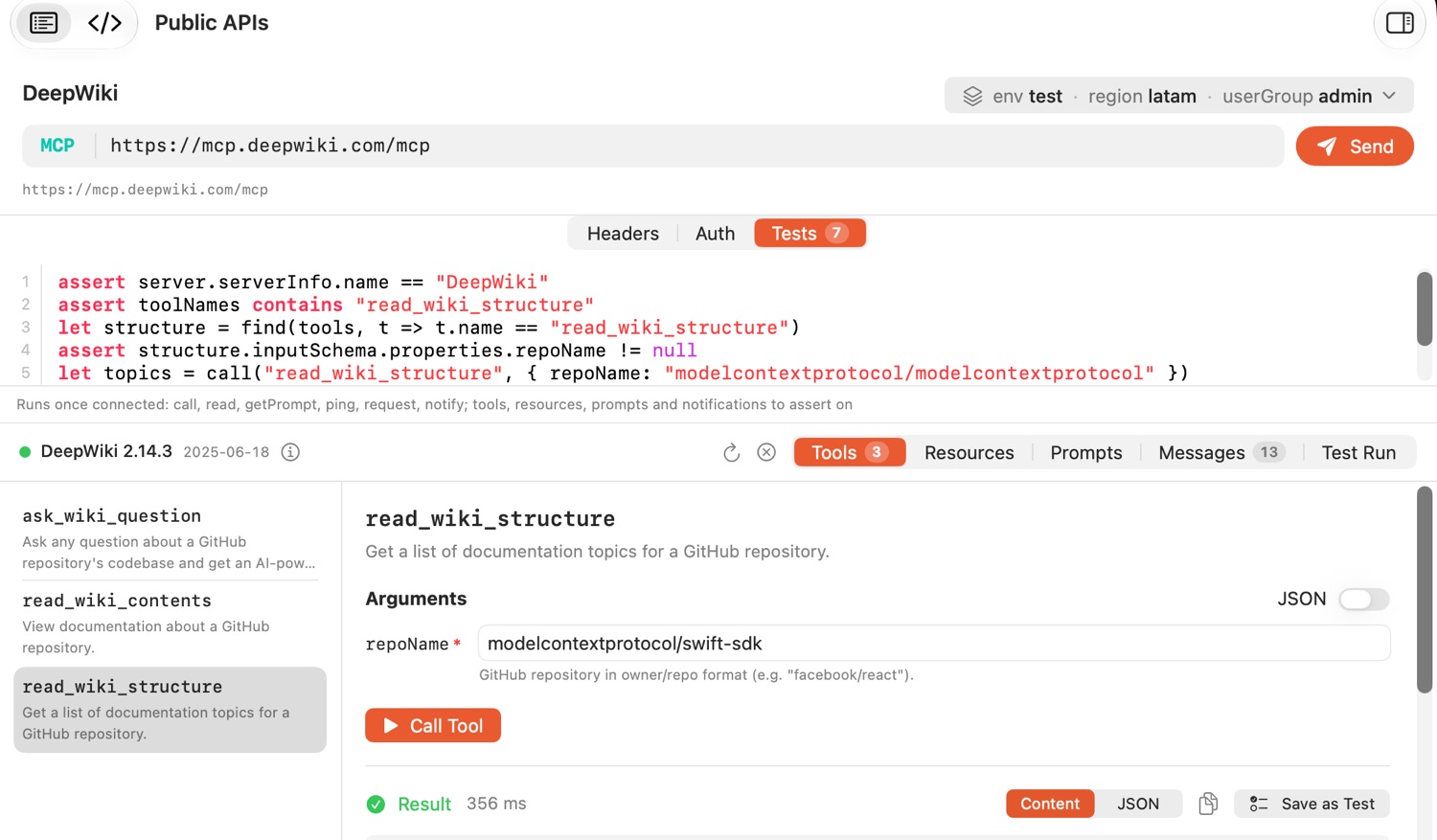
- Select the request. An
MCPrequest has only Headers, Auth and Tests above, and the lower half of the window is an inspector instead of a response. - Press Connect. The dot turns green, the server's name and the protocol version appear next to it, and the button beside them opens what the server said about itself: its instructions and its capabilities.
- Open Tools. The tab counts them, and the list marks the ones the server called read-only, destructive, or reaching outside systems. Pick one and the form on the right is built from its input schema, with a JSON switch for writing the whole argument object instead.
- Press Call Tool (⇧⌘↩). What came back appears under the form, as Content or as JSON. Save as Test writes that call into the request's Tests tab as a
letline, with assertions on the answer you just got. - Resources and Prompts work the same way, with Read Resource and Get Prompt on the same shortcut. A resource template gets a field for each variable in its URI and shows the URI they build.
- Messages is every message of the session in both directions, one line each, and a line opens to its JSON. ⌘↩ runs the request's own script and switches to Test Run, where its assertions are.
This is the part a file cannot do for you. What a server offers is something you read off the screen rather than guess at, a call can be tried before you decide what to assert about it, and the protocol underneath is there while it happens. What you keep is still a script in the file.
This is the client side. The other direction, letting an agent run the requests in your workspace, is stamp mcp: see Working with an AI agent. Next to this, WebSockets, GraphQL and WebRTC covers the other methods with a conversation of their own, and Scripts and assertions the statements every script shares.